
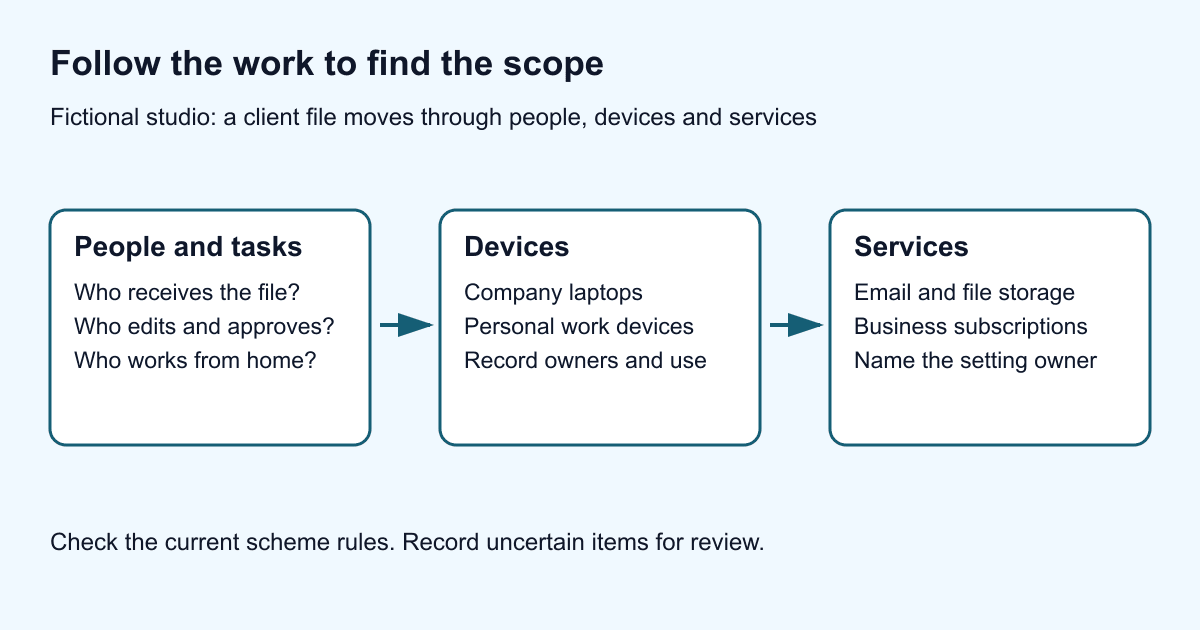
A small office can use a surprising amount of technology. Picture a design studio with eight company laptops, three people reading work email on personal phones, an online accounts package and a file-sharing subscription bought by one project team. Count only the equipment in the office and you'll miss several ways people access its information.
When you work out the scope of your Cyber Essentials assessment, start with how people actually do their jobs. Here's a way to find the devices and services they use, decide which belong in scope and keep a record you can explain to your assessor.
Start with the current scope rules
IASME's scope guidance explains which business technology the assessment covers, including home working and cloud services. A device doesn't fall outside the assessment just because someone uses it away from the office.
Check the current NCSC v3.3 requirements for the precise rules. Cloud services that host your organisation's data or services can't be excluded. Employees' own devices are in scope if they access that information. Devices used only for native calls, native texts or MFA applications are excluded. Third-party devices have separate scoping rules, so check who owns and uses them before deciding where they fit.
IASME's question preview contains the Danzell questions used for assessments purchased from 27 April 2026. Read the scope questions before you start collecting information. They'll help you focus on what you need to find out.
Follow one piece of work from start to finish
Ask a colleague to walk you through a real task. Where does a customer enquiry arrive? Who opens it? Where is the quotation written, approved and stored? Which phone receives the reply outside office hours? Those questions often reveal more than asking someone to list all their software.
In our fictional studio, a designer might mention downloading client files to a personal laptop during busy periods. Someone in finance might name a receipt app that never made it onto the IT subscription list. Both matter. You need to understand where work takes place, even when it doesn't follow the written policy.
Keep two lists that you can compare:
- Devices: who uses each one, who owns it, its operating system and version, its work purpose and who maintains it.
- Services: the business purpose, the responsible person, the data handled, the users and administrators, and the devices used to access it.
Keep the exercise manageable. Collect enough information to make and check your scope decisions. You don't need people's personal browsing histories to answer these questions.
Give every cloud service an owner
IASME's scope guidance makes clear that your organisation is responsible for making sure the controls are in place, even when a provider does some of the work. The subscription invoice won't tell you who looks after each setting.
Put someone in charge of finding the provider's relevant security and contract documents. Ask them to identify the settings your business controls and follow up anything that's unclear. Save a link to each document and note when it was checked. That saves the next person from repeating the search.
For example, the studio's project lead could be responsible for the file-sharing service, while its IT provider manages the identity settings. Write down both roles. “The supplier handles it” won't help much when someone needs to change a setting or investigate an account.
Check whether another team has opened a second account with the same provider, too. One familiar brand name in a spreadsheet can hide several workspaces, each with its own settings and administrators.
Make a workable decision about personal devices
If staff use their own devices for work, you need an arrangement everyone can follow. This is usually called bring your own device, or BYOD. In our studio example, telling people to stop using personal phones doesn't solve the problem if client messages still arrive there the next morning.
For each personal device, agree who will check its work-related settings, keep it updated and remove work access when the arrangement changes. Explain this to the owner before choosing a management tool. Be clear about what IT needs to see and which personal information it shouldn't collect.
If you can't make that arrangement work, supplying a company device may be easier to manage. That's a practical option, not an extra Cyber Essentials requirement. Once you've agreed what to do, check that people's access matches the decision.
A phone used only for an authenticator is different from one that also opens the work inbox. Write down how it's used, and revisit that record when someone's habits change.
Check your list with the people who use it
Set aside a short meeting with the people who look after IT, purchasing and day-to-day work. Compare your lists with subscription records, device-management records and what colleagues have told you. Has anything been bought for a trial, inherited from another team or kept after a project ended?
Write a short scope note, an action list and any questions for your Certification Body. If you're unsure about an item, note what you still need to find out and who will do it. Don't leave it out of scope just to get the form finished.
Keep those records somewhere you can update them when someone buys a new tool or starts working differently. Once you've settled the scope, our self-assessment preparation walkthrough will help you organise the rest of the work.
A scope and responsibility worksheet
For each item, record the work it supports, its owner, who uses it, who maintains it and why you think it belongs inside or outside the assessment. Add the source you checked, any unresolved question and the person who will resolve it. These are practical preparation fields, not a replacement for the official scope questions.
| Item in the fictional studio | Responsibility to confirm | Question still open |
|---|---|---|
| Organisation laptops | IT provider maintains them. Operations lead checks the inventory. | Does the list match the devices people currently use? |
| Personal phone opening work email | Agree work-related checks with the owner and whoever manages access. | Which services can it access, and who keeps its software supported? |
| File-sharing subscription | Project lead owns the service. Confirm who administers its settings. | Is there a second workspace bought by another team? |
Download the scope worksheet as CSV. Replace the clearly fictional example row with your own information. If a decision is uncertain, record the question and take it to your Certification Body rather than excluding the item to finish the list. Do not collect personal browsing histories or passwords.